Five AI agents. One appraiser. Zero busywork.
Example activity with sample data
← swipe →
Illustrative workflow
Stop filling out forms.
Start reviewing finished work.

Review the sources, correct the draft, and make your own adjustments. You remain the appraiser.

On AI & compliance
We don't write your appraisal.
You do.
ValueSwell helps turn your observations and source material into a draft. You review the facts, choose comparables, make adjustments and decide the opinion of value.
Agents help transcribe, organize, check and package the work. Review the wording and evidence before approving a report for signature or delivery.
- · Opinion of value
- · Analysis and conclusions
- · Comparables and adjustments
- · Approval to sign and deliver
- · Transcribe your observations
- · Prepare draft form fields
- · Retain captured source evidence
- · Flag missing items for you
The kitchen was fully renovated in the last two years — quartz counters, new cabinets, stainless appliances. I'm treating it as superior to Comp 2.

The workfile, built as we go
Your MLS. Your screenshots.
A defensible work file.
Sign in through your own MLS browser, navigate to the property, and choose what to capture. Save the loaded page HTML, screenshot and source URL to your workfile, then confirm the extracted facts yourself.
Review the saved evidence alongside each draft. Capture is subject to your MLS’s rules; content inside frames or not yet loaded may need a separate capture.
You sign in and navigate in your browser or the mobile WebView. Your credentials stay with that browser.
Capture is an explicit action. Review the saved image and page details before relying on the extracted fields.
County and flood records stay separate from MLS evidence. Missing listing facts remain for you to resolve.
ValueSwell saves the page you choose. It does not navigate or operate your MLS on your behalf.
- Appraiser·14:02:11Selected an MLS listing for capture→ Page opened and captured by the appraiser
- Capture·14:02:14Saved the visible screenshot and loaded page HTML→ sha256: 9c3f…a201 · timestamped · read-only
- Scout·14:02:34Prepared draft property fields from the saved page→ Awaiting appraiser confirmation against the screenshot
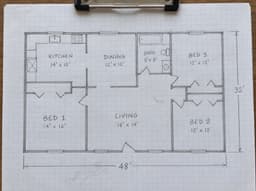
- Drafter·14:07:58Prepared a draft drawing from the field sketch→ Dimensions and area require appraiser review
- Scribe·14:11:02Prepared narrative fields for review→ Voice note · 2025-04-02 · 00:04:21
- Watchdog·14:12:40Flagged an adjustment for review→ Review the context and your supporting analysis
How it works
Three ways in.
One finished report.
Record fresh, import your current work, or convert old reports. All three paths meet at the same place: a draft you review, approve and prepare for delivery in a supported form.
Legacy 1004, 1073, 1025, or MISMO 2.6 report? Drop it in and we convert it to UAD 3.6 — with a field-by-field map so you can see every change before you sign. And if your target isn't 3.6, pick any other format.
Fastest · recommendedUse our mobile app
Walk. Talk. Review. Sign.
- 01Record your walkthroughNarrate the property as you walk and talk in your own voice.
- 02Agents build the draftScout pulls comps, Drafter builds the floor plan, Scribe places your words.
Keep your stackUse your existing tools
Bring your software. We handle the rest.
- 01Keep using TOTAL, ACI, Bradford…Work however you work today. Import your in-progress report when ready.
- 02Agents review, verify, and flagWatchdog runs USPAP + lender checks. Scout cites missing sources.
Most popular entry pointConvert legacy reports
Any format in. Any format out.
- 01Upload legacy PDFs or XMLOld 1004, 1073, 1025, 2055, narrative reports — or MISMO 2.6 — dropped in as-is.
- 02Out as UAD 3.6, updated MISMO, or your targetIncludes field-by-field mapping so you can see exactly what changed.
Coverage
Every residential form. Every assignment type.
Mortgage, relocation, REO, estate, divorce, tax appeal, pre-listing. Commercial narrative in preview.
Meet the team
Five specialists. One report.
Illustrative previews with sample data. Your report requires your review and approval.
Scout
Scout organizes available county and flood records and helps prepare comparable candidates. You navigate your MLS, capture the listings you choose, and confirm the facts before using them.
MLS pages you capture · Available county and flood records · Comparable candidates for your review
Drafter
Record your observations and supply your measurements or field sketch. Drafter prepares a drawing and organizes property evidence for you to review and correct.
Appraiser-supplied dimensions · Field-sketch interpretation · Photo and walkthrough evidence
Scribe
Scribe helps organize your observations into draft report fields and narratives. Review the wording, facts and conclusions before accepting them.
UAD 3.6 data dictionary · Legacy UAD and narrative form conventions · MISMO 3.6 reference model
Watchdog
Watchdog flags missing information and configured compliance issues for your review. It supports your checks; it does not certify the report or replace a qualified reviewer.
Missing-field checks · Configured form and GSE rules · Reviewable issue lists
Courier
After your approval, Courier helps package the report, use configured delivery channels, and track delivery and revision status.
Report packaging · Configured delivery channels · Delivery and revision status
- report_123-oak.pdfsigned with appraiser approval2.4 MB
- report_123-oak.mismo3.6.xmlschema-validated · UAD 3.6142 KB
- evidence_123-oak.pdfscreenshots · comps · addenda8.1 MB
- photo_exhibit.pdfsample photo exhibit3.2 MB
- 14:03:12Package sealedSHA-256 hash recorded
- 14:03:14Compliance gateConfigured checks reviewed by the appraiser
- 14:03:22Routed to First FederalConfigured delivery channel · example order
- 14:03:52Report submittedAwaiting channel acknowledgment
- 14:04:22Delivery status recordedCheck the recipient response
- 14:05:01Lender acknowledgmentwaiting on receipt confirmation
- —Closing package assembledscheduled when all parties confirm

Earn more
Higher fees.
Smarter operations.
Accept orders from the order originators and AMCs running on ValueSwell — lenders, attorneys, accountants, government offices, and businesses. Automation replaces the operational overhead that used to eat half of every fee — so more of the fee reaches you.
The platform fee covers intake, routing, QC, delivery, and status tracking — work that traditionally required human operations teams. AMCs partnering with ValueSwell pass that same efficiency to their panels.
Who else uses ValueSwell
Built for appraisers. Useful to everyone else.
Pricing
Three free to start. Then pay per report.
No artificial caps. No pooled-seat math. Sign a report, pay for a report — or go Pro at 7 reports/month.
Pay-as-you-go
No subscription. Sign a report, pay $29.
- First 3 reports free — no credit card
- Full 5-agent team
- Every residential form
- 30-day cloud retention · export anytime
Pro
Pays for itself at 7 reports / month.
- $14 off every report vs. PAYG
- 7-year cloud retention · keep required workfile copies
- Searchable archive · one-click revisions
- Priority marketplace consideration
Firm
Multi-seat shops. 3-seat minimum.
- Cheapest per-report rate
- Team admin · SSO · shared workfile library
- Centralized billing · usage dashboard
- Priority marketplace · same-day support

Your team is ready.
Are you?
Free tier. No credit card required. Cancel anytime.